PLUMED Masterclass 21.6: Dimensionality reduction
Aims
The primary aim of this Masterclass is to show you how you might use PLUMED in your work.
We will see how to call PLUMED from a python notebook and discuss some strategies for selecting
collective variables.
Objectives
Once this series of exercises is completed, users will be able to:
- Run dimensionality reduction algorithms with PLUMED
Resources
The data needed to complete this Masterclass can be found on GitHub.
You can clone this repository locally on your machine using the following command:
git clone https://github.com/plumed/masterclass-21-6.git
I recommend that you run each exercise in a separate sub-directory (i.e. Exercise-1, Exercise-2, …), which you can create inside the root directory masterclass-21-6. Organizing your data this way will help you to keep things clean.
All the exercises have been tested with PLUMED version 2.7.0.
Acknowledgements
Throughout this exercise, we use the atomistic simulation environment
and chemiscope. Please look at the information at the links I have provided here
for more information about these codes.
Exercises
Chemiscope comes into its own when you are working with a machine learning algorithm. These algorithms can (in theory) learn the collective variables you need to use from the trajectory data.
To make sense of the coordinates that have been learned, you have to carefully visualize where structures are projected in the low dimensional space. You can use chemiscope to complete this
process of visualizing the representation the computer has found for you. In this next set of exercises, we will apply various dimensionality reduction algorithms to the data
contained in the file traj.pdb. If you visualize the contents of that file using VMD, you will see that this file contains a short protein trajectory. You are perhaps unsure what
CV to analyze this data and thus want to see if you can shed any light on the contents of the trajectory by using machine learning.
Typically, PLUMED analyses one set of atomic coordinates at a time. To run a machine learning algorithm, however, you need to gather information on multiple configurations.
Therefore, the first thing you need to learn to use these algorithms is how to store configurations for later analysis with a machine learning algorithm. The following input
illustrates how to complete this task using PLUMED.
MOLINFOThis command is used to provide information on the molecules that are present in your system. More details STRUCTUREa file in pdb format containing a reference structure=__FILL__ MOLTYPE what kind of molecule is contained in the pdb file - usually not needed since protein/RNA/DNA are compatible=protein
The MOLINFO action with label calculates somethingcc: COLLECT_FRAMESCollect atomic positions or argument values from the trajectory for later analysis More details __FILL__=@nonhydrogensall non hydrogen atoms. Click here for more information.
The COLLECT_FRAMES action with label cc calculates the following quantities:| Quantity | Description |
| cc.data | the data that is being collected by this action |
| cc.logweights | the logarithms of the weights of the data points |
DUMPPDBOutput PDB file. More details ATOMSvalue containing positions of atoms that should be output=cc_data ATOM_INDICESthe indices of the atoms in your PDB output=@nonhydrogensall non hydrogen atoms. Click here for more information. FILEthe name of the file on which to output these quantities=traj.pdb
MOLINFOThis command is used to provide information on the molecules that are present in your system. More details STRUCTUREa file in pdb format containing a reference structure=../data/bhp.pdb MOLTYPE what kind of molecule is contained in the pdb file - usually not needed since protein/RNA/DNA are compatible=protein
The MOLINFO action with label calculates somethingcc: COLLECT_FRAMESCollect atomic positions or argument values from the trajectory for later analysis More details ATOMSlist of atomic positions that you would like to collect and store for later analysis=@nonhydrogensall non hydrogen atoms. Click here for more information.
The COLLECT_FRAMES action with label cc calculates the following quantities:| Quantity | Description |
| cc.data | the data that is being collected by this action |
| cc.logweights | the logarithms of the weights of the data points |
DUMPPDBOutput PDB file. More details ATOMSvalue containing positions of atoms that should be output=cc_data ATOM_INDICESthe indices of the atoms in your PDB output=@nonhydrogensall non hydrogen atoms. Click here for more information. FILEthe name of the file on which to output these quantities=traj.pdb
Copy the input above into a plumed file and fill in the blanks. You should then be able to run the command using:
Then, once all the blanks are filled in, run the command using:
plumed driver --mf_pdb traj.pdb
You can also store the values of collective variables for later analysis with these algorithms. Modify the input above so that all
Thirty backbone dihedral angles in the protein are stored, and output using OUTPUT_ANALYSIS_DATA_TO_COLVAR and rerun the calculation.
You can find more information on the dimensionality reduction algorithms that we are using in this section in this paper.
PCA
Having learned how to store data for later analysis with a dimensionality reduction algorithm, lets now apply principal component analysis (PCA) upon
our stored data. In principle component analysis, low dimensional projections for our trajectory are constructed by:
- Computing a covariance matrix from the trajectory data
- Diagonalizing the covariance matrix.
- Calculating the projection of each trajectory frame on a subset of the eigenvectors of the covariance matrix.
To perform PCA using PLUMED, we are going to use the following input with the blanks filled in:
MOLINFOThis command is used to provide information on the molecules that are present in your system. More details STRUCTUREa file in pdb format containing a reference structure=__FILL__ MOLTYPE what kind of molecule is contained in the pdb file - usually not needed since protein/RNA/DNA are compatible=protein
The MOLINFO action with label calculates somethingcc: COLLECT_FRAMESCollect atomic positions or argument values from the trajectory for later analysis More details __FILL__=@nonhydrogensall non hydrogen atoms. Click here for more information.
The COLLECT_FRAMES action with label cc calculates the following quantities:| Quantity | Description |
| cc.data | the data that is being collected by this action |
| cc.logweights | the logarithms of the weights of the data points |
pca: PCAPerform principal component analysis (PCA) using either the positions of the atoms a large number of collective variables as input. More details ARGthe arguments that you would like to make the histogram for=__FILL__ NLOW_DIMnumber of low-dimensional coordinates required=2 FILEthe file on which to output the low dimensional coordinates=pca_proj.pdb
The PCA action with label pca calculates the following quantities:| Quantity | Description |
| pca.value | the projections of the input coordinates on the PCA components that were found from the covariance matrix |
DUMPVECTORPrint a vector to a file More details ARGthe labels of vectors/matrices that should be output in the file=__FILL__ FILE the file on which to write the vetors=pca_data
alpha: ALPHARMSDProbe the alpha helical content of a protein structure. More details RESIDUESthis command is used to specify the set of residues that could conceivably form part of the secondary structure=all
The ALPHARMSD action with label alpha calculates the following quantities:| Quantity | Description |
| alpha.struct | the vectors containing the rmsd distances between the residues and each of the reference structures |
| alpha.lessthan | the number blocks of residues that have an RMSD from the secondary structure that is less than the threshold |
| alpha.value | if LESS_THAN is present the RMSD distance between each residue and the ideal alpha helix |
abeta: ANTIBETARMSDProbe the antiparallel beta sheet content of your protein structure. More details RESIDUESthis command is used to specify the set of residues that could conceivably form part of the secondary structure=all STRANDS_CUTOFFIf in a segment of protein the two strands are further apart then the calculation of the actual RMSD is skipped as the structure is very far from being beta-sheet like=1.0
The ANTIBETARMSD action with label abeta calculates the following quantities:| Quantity | Description |
| abeta.struct | the vectors containing the rmsd distances between the residues and each of the reference structures |
| abeta.lessthan | the number blocks of residues that have an RMSD from the secondary structure that is less than the threshold |
| abeta.value | if LESS_THAN is present the RMSD distance between each residue and the ideal antiparallel beta sheet |
pbeta: PARABETARMSDProbe the parallel beta sheet content of your protein structure. More details RESIDUESthis command is used to specify the set of residues that could conceivably form part of the secondary structure=all STRANDS_CUTOFFIf in a segment of protein the two strands are further apart then the calculation of the actual RMSD is skipped as the structure is very far from being beta-sheet like=1.0
The PARABETARMSD action with label pbeta calculates the following quantities:| Quantity | Description |
| pbeta.struct | the vectors containing the rmsd distances between the residues and each of the reference structures |
| pbeta.lessthan | the number blocks of residues that have an RMSD from the secondary structure that is less than the threshold |
| pbeta.value | if LESS_THAN is present the RMSD distance between each residue and the ideal parallel beta sheet |
cc2: COLLECT_FRAMESCollect atomic positions or argument values from the trajectory for later analysis More details ARGthe labels of the values whose time series you would like to collect for later analysis=alpha,abeta,pbeta
The COLLECT_FRAMES action with label cc2 calculates the following quantities:| Quantity | Description |
| cc2.data | the data that is being collected by this action |
| cc2.logweights | the logarithms of the weights of the data points |
DUMPVECTORPrint a vector to a file More details ARGthe labels of vectors/matrices that should be output in the file=cc2_data FILE the file on which to write the vetors=secondary_structure_data
MOLINFOThis command is used to provide information on the molecules that are present in your system. More details STRUCTUREa file in pdb format containing a reference structure=../data/bhp.pdb MOLTYPE what kind of molecule is contained in the pdb file - usually not needed since protein/RNA/DNA are compatible=protein
The MOLINFO action with label calculates somethingcc: COLLECT_FRAMESCollect atomic positions or argument values from the trajectory for later analysis More details ATOMSlist of atomic positions that you would like to collect and store for later analysis=@nonhydrogensall non hydrogen atoms. Click here for more information.
The COLLECT_FRAMES action with label cc calculates the following quantities:| Quantity | Description |
| cc.data | the data that is being collected by this action |
| cc.logweights | the logarithms of the weights of the data points |
pca: PCAPerform principal component analysis (PCA) using either the positions of the atoms a large number of collective variables as input. More details ARGthe arguments that you would like to make the histogram for=cc NLOW_DIMnumber of low-dimensional coordinates required=2 FILEthe file on which to output the low dimensional coordinates=pca_proj.pdb
The PCA action with label pca calculates the following quantities:| Quantity | Description |
| pca.value | the projections of the input coordinates on the PCA components that were found from the covariance matrix |
DUMPVECTORPrint a vector to a file More details ARGthe labels of vectors/matrices that should be output in the file=pca FILE the file on which to write the vetors=pca_data
alpha: ALPHARMSDProbe the alpha helical content of a protein structure. More details RESIDUESthis command is used to specify the set of residues that could conceivably form part of the secondary structure=all
The ALPHARMSD action with label alpha calculates the following quantities:| Quantity | Description |
| alpha.struct | the vectors containing the rmsd distances between the residues and each of the reference structures |
| alpha.lessthan | the number blocks of residues that have an RMSD from the secondary structure that is less than the threshold |
| alpha.value | if LESS_THAN is present the RMSD distance between each residue and the ideal alpha helix |
abeta: ANTIBETARMSDProbe the antiparallel beta sheet content of your protein structure. More details RESIDUESthis command is used to specify the set of residues that could conceivably form part of the secondary structure=all STRANDS_CUTOFFIf in a segment of protein the two strands are further apart then the calculation of the actual RMSD is skipped as the structure is very far from being beta-sheet like=1.0
The ANTIBETARMSD action with label abeta calculates the following quantities:| Quantity | Description |
| abeta.struct | the vectors containing the rmsd distances between the residues and each of the reference structures |
| abeta.lessthan | the number blocks of residues that have an RMSD from the secondary structure that is less than the threshold |
| abeta.value | if LESS_THAN is present the RMSD distance between each residue and the ideal antiparallel beta sheet |
pbeta: PARABETARMSDProbe the parallel beta sheet content of your protein structure. More details RESIDUESthis command is used to specify the set of residues that could conceivably form part of the secondary structure=all STRANDS_CUTOFFIf in a segment of protein the two strands are further apart then the calculation of the actual RMSD is skipped as the structure is very far from being beta-sheet like=1.0
The PARABETARMSD action with label pbeta calculates the following quantities:| Quantity | Description |
| pbeta.struct | the vectors containing the rmsd distances between the residues and each of the reference structures |
| pbeta.lessthan | the number blocks of residues that have an RMSD from the secondary structure that is less than the threshold |
| pbeta.value | if LESS_THAN is present the RMSD distance between each residue and the ideal parallel beta sheet |
cc2: COLLECT_FRAMESCollect atomic positions or argument values from the trajectory for later analysis More details ARGthe labels of the values whose time series you would like to collect for later analysis=alpha,abeta,pbeta
The COLLECT_FRAMES action with label cc2 calculates the following quantities:| Quantity | Description |
| cc2.data | the data that is being collected by this action |
| cc2.logweights | the logarithms of the weights of the data points |
DUMPVECTORPrint a vector to a file More details ARGthe labels of vectors/matrices that should be output in the file=cc2_data FILE the file on which to write the vetors=secondary_structure_data
To generate the projection, you run the command:
plumed driver --mf_pdb traj.pdb
You can generate a projection of the data above using chemiscope by using the following script:
# This ase command should read in the traj.pdb file that was analyzed.  Notice that the analysis
# actions below ignore the first frame in this trajectory, so we need to take that into account
# when we generated the chemiscope
traj = ase.io.read('../data/traj.pdb',':')
# This reads in the PCA projection that are output by by the OUTPUT_ANALYSIS_DATA_TO_COLVAR command
# above
projection = np.loadtxt("pca_data")
# We also read in the secondary structure data by colouring points following the secondary
# structure. We can get a sense of how good our projection is.
structure = np.loadtxt("secondary_structure_data")

# This ensures that the atomic masses are used in place of the symbols
# when constructing the atomic configurations' chemiscope representations.
# Using the symbols will not work because ase is written by chemists and not
# biologists.  For a chemist, HG1 is mercury as opposed to the first hydrogen
# on a guanine residue.
for frame in traj:
    frame.numbers = np.array(
        [
            np.argmin(np.subtract(atomic_masses, float(am)) ** 2)
            for am in frame.arrays["occupancy"]
        ]
    )

# This constructs the dictionary of properties for chemiscope
properties = {
    "pca1": {
        "target": "structure",
        "values": projection[:,0],
        "description": "First principle component",
    },
    "pca2": {
        "target": "structure",
        "values": projection[:,1],
        "description": "Second principle component",
    },
    "alpha": {
        "target": "structure",
        "values": structure[:,0],
        "description": "Alpha helical content",
    },
    "antibeta": {
        "target": "structure",
        "values": structure[:,1],
        "description": "Anti parallel beta sheet content",
    },
    "parabeta": {
        "target": "structure",
        "values": structure[:,2],
        "description": "Parallel beta sheet content",
    },
}

# This generates our chemiscope output
write_input("pca_chemiscope.json.gz", frames=traj[1:], properties=properties )
When the output from this set of commands is loaded into chemiscope, we can construct figures like the one shown below. On the axes here, we have plotted the PCA coordinates. The
points are then coloured according to the alpha-helical content.
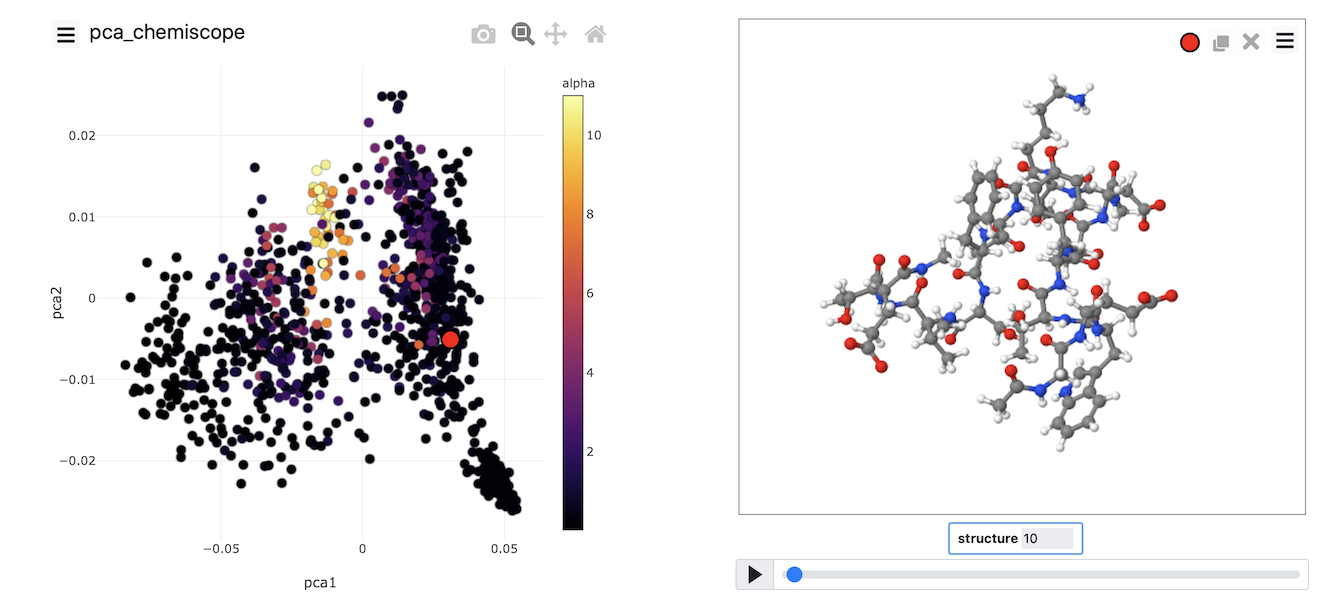
See if you can use PLUMED and chemiscope to generate a figure similar to the one above. Try to experiment with the way the points are coloured. Look at the beta-sheet content as well.
MDS
In the previous section, we performed PCA on the atomic positions directly. In the section before last, however, we also saw how we could store high-dimensional vectors of collective variables and then
use them as input to a dimensionality reduction algorithm. Therefore, we might legitimately ask if we can do PCA using these high-dimensional vectors as input rather than atomic positions.
The answer to this question is yes as long as the CV is not periodic. If any of our CVs are not periodic, we cannot analyze them using the PCA action. We can, however, formulate the PCA algorithm
differently. In this alternative formulation, which is known as classical multidimensional scaling (MDS), we do the following:
- We calculate the matrix of distances between configurations
- We perform an operation known as centring the matrix.
- We diagonalize the centred matrix
The eigenvectors multiplied by the corresponding eigenvalue’s square root can then be used as a set of projections for our input points.
This method is used less often than PCA as the matrix that we have to diagonalize here in the third step can be considerably larger than the matrix that we have to diagonalize when we perform PCA.
To avoid this expensive diagonalization step, we often select a subset of so-called landmark points on which to run the algorithm directly. Projections for the remaining points are then found
by using a so-called out-of-sample procedure. This is what has been done in the following input:
MOLINFOThis command is used to provide information on the molecules that are present in your system. More details STRUCTUREa file in pdb format containing a reference structure=__FILL__ MOLTYPE what kind of molecule is contained in the pdb file - usually not needed since protein/RNA/DNA are compatible=protein
The MOLINFO action with label calculates somethingcc: COLLECT_FRAMESCollect atomic positions or argument values from the trajectory for later analysis More details ATOMSlist of atomic positions that you would like to collect and store for later analysis=@nonhydrogensall non hydrogen atoms. Click here for more information.
The COLLECT_FRAMES action with label cc calculates the following quantities:| Quantity | Description |
| cc.data | the data that is being collected by this action |
| cc.logweights | the logarithms of the weights of the data points |
r2-phi: TORSIONCalculate one or multiple torsional angles. More details ATOMSthe four atoms involved in the torsional angle=@phi-2the four atoms that are required to calculate the phi dihedral for residue 2. Click here for more information.
The TORSION action with label r2-phi calculates the following quantities:| Quantity | Description |
| r2-phi.value | the TORSION involving these atoms |
r2-psi: TORSIONCalculate one or multiple torsional angles. More details ATOMSthe four atoms involved in the torsional angle=@psi-2the four atoms that are required to calculate the psi dihedral for residue 2. Click here for more information.
The TORSION action with label r2-psi calculates the following quantities:| Quantity | Description |
| r2-psi.value | the TORSION involving these atoms |
r3-phi: TORSIONCalculate one or multiple torsional angles. More details ATOMSthe four atoms involved in the torsional angle=@phi-3the four atoms that are required to calculate the phi dihedral for residue 3. Click here for more information.
The TORSION action with label r3-phi calculates the following quantities:| Quantity | Description |
| r3-phi.value | the TORSION involving these atoms |
r3-psi: TORSIONCalculate one or multiple torsional angles. More details ATOMSthe four atoms involved in the torsional angle=@psi-3the four atoms that are required to calculate the psi dihedral for residue 3. Click here for more information.
The TORSION action with label r3-psi calculates the following quantities:| Quantity | Description |
| r3-psi.value | the TORSION involving these atoms |
r4-phi: TORSIONCalculate one or multiple torsional angles. More details __FILL__
The TORSION action with label r4-phi calculates the TORSION involving these atomsr4-psi: TORSIONCalculate one or multiple torsional angles. More details __FILL__
The TORSION action with label r4-psi calculates the TORSION involving these atomsr5-phi: TORSIONCalculate one or multiple torsional angles. More details __FILL__
The TORSION action with label r5-phi calculates the TORSION involving these atomsr5-psi: TORSIONCalculate one or multiple torsional angles. More details __FILL__
The TORSION action with label r5-psi calculates the TORSION involving these atomsr6-phi: TORSIONCalculate one or multiple torsional angles. More details __FILL__
The TORSION action with label r6-phi calculates the TORSION involving these atomsr6-psi: TORSIONCalculate one or multiple torsional angles. More details __FILL__
The TORSION action with label r6-psi calculates the TORSION involving these atomsr7-phi: TORSIONCalculate one or multiple torsional angles. More details __FILL__
The TORSION action with label r7-phi calculates the TORSION involving these atomsr7-psi: TORSIONCalculate one or multiple torsional angles. More details __FILL__
The TORSION action with label r7-psi calculates the TORSION involving these atomsr8-phi: TORSIONCalculate one or multiple torsional angles. More details __FILL__
The TORSION action with label r8-phi calculates the TORSION involving these atomsr8-psi: TORSIONCalculate one or multiple torsional angles. More details __FILL__
The TORSION action with label r8-psi calculates the TORSION involving these atomsr9-phi: TORSIONCalculate one or multiple torsional angles. More details __FILL__
The TORSION action with label r9-phi calculates the TORSION involving these atomsr9-psi: TORSIONCalculate one or multiple torsional angles. More details __FILL__
The TORSION action with label r9-psi calculates the TORSION involving these atomsr10-phi: TORSIONCalculate one or multiple torsional angles. More details __FILL__
The TORSION action with label r10-phi calculates the TORSION involving these atomsr10-psi: TORSIONCalculate one or multiple torsional angles. More details __FILL__
The TORSION action with label r10-psi calculates the TORSION involving these atomsr11-phi: TORSIONCalculate one or multiple torsional angles. More details __FILL__
The TORSION action with label r11-phi calculates the TORSION involving these atomsr11-psi: TORSIONCalculate one or multiple torsional angles. More details __FILL__
The TORSION action with label r11-psi calculates the TORSION involving these atomsr12-phi: TORSIONCalculate one or multiple torsional angles. More details __FILL__
The TORSION action with label r12-phi calculates the TORSION involving these atomsr12-psi: TORSIONCalculate one or multiple torsional angles. More details __FILL__
The TORSION action with label r12-psi calculates the TORSION involving these atomsr13-phi: TORSIONCalculate one or multiple torsional angles. More details __FILL__
The TORSION action with label r13-phi calculates the TORSION involving these atomsr13-psi: TORSIONCalculate one or multiple torsional angles. More details __FILL__
The TORSION action with label r13-psi calculates the TORSION involving these atomsr14-phi: TORSIONCalculate one or multiple torsional angles. More details __FILL__
The TORSION action with label r14-phi calculates the TORSION involving these atomsr14-psi: TORSIONCalculate one or multiple torsional angles. More details __FILL__
The TORSION action with label r14-psi calculates the TORSION involving these atomsr15-phi: TORSIONCalculate one or multiple torsional angles. More details __FILL__
The TORSION action with label r15-phi calculates the TORSION involving these atomsr15-psi: TORSIONCalculate one or multiple torsional angles. More details __FILL__
The TORSION action with label r15-psi calculates the TORSION involving these atomsr16-phi: TORSIONCalculate one or multiple torsional angles. More details __FILL__
The TORSION action with label r16-phi calculates the TORSION involving these atomsr16-psi: TORSIONCalculate one or multiple torsional angles. More details __FILL__
The TORSION action with label r16-psi calculates the TORSION involving these atomsangles: COLLECT_FRAMESCollect atomic positions or argument values from the trajectory for later analysis More details __FILL__=r2-phi,r2-psi,r3-phi,r3-psi,r4-phi,r4-psi,r5-phi,r5-psi,r6-phi,r6-psi,r7-phi,r7-psi,r8-phi,r8-psi,r9-phi,r9-psi,r10-phi,r10-psi,r11-phi,r11-psi,r12-phi,r12-psi,r13-phi,r13-psi,r14-phi,r14-psi,r15-phi,r15-psi,r16-phi,r16-psi
The COLLECT_FRAMES action with label angles calculates the following quantities:| Quantity | Description |
| angles.data | the data that is being collected by this action |
| angles.logweights | the logarithms of the weights of the data points |
fps: LANDMARK_SELECT_FPSSelect a of landmarks from a large set of configurations using farthest point sampling. More details ARGthe COLLECT_FRAMES action that you used to get the data=__FILL__ NLANDMARKSthe numbe rof landmarks you would like to create=500
The LANDMARK_SELECT_FPS action with label fps calculates the following quantities:| Quantity | Description |
| fps.data | the data that is being collected by this action |
| fps.logweights | the logarithms of the weights of the data points |
mds: CLASSICAL_MDSCreate a low-dimensional projection of a trajectory using the classical multidimensional More details __FILL__=fps NLOW_DIMnumber of low-dimensional coordinates required=2
The CLASSICAL_MDS action with label mds calculates the following quantities:| Quantity | Description |
| mds.value | the low dimensional projections for the input data points |
osample: PROJECT_POINTSFind the projection of a point in a low dimensional space by matching the (transformed) distance between it and a series of reference configurations that were input More details ARGthe projections of the landmark points=__FILL__ TARGET1the matrix of target quantities that you would like to match=fps_rectdissims FUNC1a function that is applied on the distances between the points in the low dimensional space={CUSTOM R_0=1 FUNC=sqrt(x)} WEIGHTS1the matrix with the weights of the target quantities=fps_weights
The PROJECT_POINTS action with label osample calculates the following quantities:| Quantity | Description |
| osample.coord | the coordinates of the points in the low dimensional space |
DUMPVECTORPrint a vector to a file More details ARGthe labels of vectors/matrices that should be output in the file=__FILL__ FILE the file on which to write the vetors=mds_data
alpha: ALPHARMSDProbe the alpha helical content of a protein structure. More details RESIDUESthis command is used to specify the set of residues that could conceivably form part of the secondary structure=all
The ALPHARMSD action with label alpha calculates the following quantities:| Quantity | Description |
| alpha.struct | the vectors containing the rmsd distances between the residues and each of the reference structures |
| alpha.lessthan | the number blocks of residues that have an RMSD from the secondary structure that is less than the threshold |
| alpha.value | if LESS_THAN is present the RMSD distance between each residue and the ideal alpha helix |
abeta: ANTIBETARMSDProbe the antiparallel beta sheet content of your protein structure. More details RESIDUESthis command is used to specify the set of residues that could conceivably form part of the secondary structure=all STRANDS_CUTOFFIf in a segment of protein the two strands are further apart then the calculation of the actual RMSD is skipped as the structure is very far from being beta-sheet like=1.0
The ANTIBETARMSD action with label abeta calculates the following quantities:| Quantity | Description |
| abeta.struct | the vectors containing the rmsd distances between the residues and each of the reference structures |
| abeta.lessthan | the number blocks of residues that have an RMSD from the secondary structure that is less than the threshold |
| abeta.value | if LESS_THAN is present the RMSD distance between each residue and the ideal antiparallel beta sheet |
pbeta: PARABETARMSDProbe the parallel beta sheet content of your protein structure. More details RESIDUESthis command is used to specify the set of residues that could conceivably form part of the secondary structure=all STRANDS_CUTOFFIf in a segment of protein the two strands are further apart then the calculation of the actual RMSD is skipped as the structure is very far from being beta-sheet like=1.0
The PARABETARMSD action with label pbeta calculates the following quantities:| Quantity | Description |
| pbeta.struct | the vectors containing the rmsd distances between the residues and each of the reference structures |
| pbeta.lessthan | the number blocks of residues that have an RMSD from the secondary structure that is less than the threshold |
| pbeta.value | if LESS_THAN is present the RMSD distance between each residue and the ideal parallel beta sheet |
cc2: COLLECT_FRAMESCollect atomic positions or argument values from the trajectory for later analysis More details ARGthe labels of the values whose time series you would like to collect for later analysis=alpha,abeta,pbeta
The COLLECT_FRAMES action with label cc2 calculates the following quantities:| Quantity | Description |
| cc2.data | the data that is being collected by this action |
| cc2.logweights | the logarithms of the weights of the data points |
DUMPVECTORPrint a vector to a file More details ARGthe labels of vectors/matrices that should be output in the file=cc2_data FILE the file on which to write the vetors=secondary_structure_data
MOLINFOThis command is used to provide information on the molecules that are present in your system. More details STRUCTUREa file in pdb format containing a reference structure=../data/bhp.pdb MOLTYPE what kind of molecule is contained in the pdb file - usually not needed since protein/RNA/DNA are compatible=protein
The MOLINFO action with label calculates somethingcc: COLLECT_FRAMESCollect atomic positions or argument values from the trajectory for later analysis More details ATOMSlist of atomic positions that you would like to collect and store for later analysis=@nonhydrogensall non hydrogen atoms. Click here for more information.
The COLLECT_FRAMES action with label cc calculates the following quantities:| Quantity | Description |
| cc.data | the data that is being collected by this action |
| cc.logweights | the logarithms of the weights of the data points |
r2-phi: TORSIONCalculate one or multiple torsional angles. More details ATOMSthe four atoms involved in the torsional angle=@phi-2the four atoms that are required to calculate the phi dihedral for residue 2. Click here for more information.
The TORSION action with label r2-phi calculates the following quantities:| Quantity | Description |
| r2-phi.value | the TORSION involving these atoms |
r2-psi: TORSIONCalculate one or multiple torsional angles. More details ATOMSthe four atoms involved in the torsional angle=@psi-2the four atoms that are required to calculate the psi dihedral for residue 2. Click here for more information.
The TORSION action with label r2-psi calculates the following quantities:| Quantity | Description |
| r2-psi.value | the TORSION involving these atoms |
r3-phi: TORSIONCalculate one or multiple torsional angles. More details ATOMSthe four atoms involved in the torsional angle=@phi-3the four atoms that are required to calculate the phi dihedral for residue 3. Click here for more information.
The TORSION action with label r3-phi calculates the following quantities:| Quantity | Description |
| r3-phi.value | the TORSION involving these atoms |
r3-psi: TORSIONCalculate one or multiple torsional angles. More details ATOMSthe four atoms involved in the torsional angle=@psi-3the four atoms that are required to calculate the psi dihedral for residue 3. Click here for more information.
The TORSION action with label r3-psi calculates the following quantities:| Quantity | Description |
| r3-psi.value | the TORSION involving these atoms |
r4-phi: TORSIONCalculate one or multiple torsional angles. More details ATOMSthe four atoms involved in the torsional angle=@phi-4the four atoms that are required to calculate the phi dihedral for residue 4. Click here for more information.
The TORSION action with label r4-phi calculates the following quantities:| Quantity | Description |
| r4-phi.value | the TORSION involving these atoms |
r4-psi: TORSIONCalculate one or multiple torsional angles. More details ATOMSthe four atoms involved in the torsional angle=@psi-4the four atoms that are required to calculate the psi dihedral for residue 4. Click here for more information.
The TORSION action with label r4-psi calculates the following quantities:| Quantity | Description |
| r4-psi.value | the TORSION involving these atoms |
r5-phi: TORSIONCalculate one or multiple torsional angles. More details ATOMSthe four atoms involved in the torsional angle=@phi-5the four atoms that are required to calculate the phi dihedral for residue 5. Click here for more information.
The TORSION action with label r5-phi calculates the following quantities:| Quantity | Description |
| r5-phi.value | the TORSION involving these atoms |
r5-psi: TORSIONCalculate one or multiple torsional angles. More details ATOMSthe four atoms involved in the torsional angle=@psi-5the four atoms that are required to calculate the psi dihedral for residue 5. Click here for more information.
The TORSION action with label r5-psi calculates the following quantities:| Quantity | Description |
| r5-psi.value | the TORSION involving these atoms |
r6-phi: TORSIONCalculate one or multiple torsional angles. More details ATOMSthe four atoms involved in the torsional angle=@phi-6the four atoms that are required to calculate the phi dihedral for residue 6. Click here for more information.
The TORSION action with label r6-phi calculates the following quantities:| Quantity | Description |
| r6-phi.value | the TORSION involving these atoms |
r6-psi: TORSIONCalculate one or multiple torsional angles. More details ATOMSthe four atoms involved in the torsional angle=@psi-6the four atoms that are required to calculate the psi dihedral for residue 6. Click here for more information.
The TORSION action with label r6-psi calculates the following quantities:| Quantity | Description |
| r6-psi.value | the TORSION involving these atoms |
r7-phi: TORSIONCalculate one or multiple torsional angles. More details ATOMSthe four atoms involved in the torsional angle=@phi-7the four atoms that are required to calculate the phi dihedral for residue 7. Click here for more information.
The TORSION action with label r7-phi calculates the following quantities:| Quantity | Description |
| r7-phi.value | the TORSION involving these atoms |
r7-psi: TORSIONCalculate one or multiple torsional angles. More details ATOMSthe four atoms involved in the torsional angle=@psi-7the four atoms that are required to calculate the psi dihedral for residue 7. Click here for more information.
The TORSION action with label r7-psi calculates the following quantities:| Quantity | Description |
| r7-psi.value | the TORSION involving these atoms |
r8-phi: TORSIONCalculate one or multiple torsional angles. More details ATOMSthe four atoms involved in the torsional angle=@phi-8the four atoms that are required to calculate the phi dihedral for residue 8. Click here for more information.
The TORSION action with label r8-phi calculates the following quantities:| Quantity | Description |
| r8-phi.value | the TORSION involving these atoms |
r8-psi: TORSIONCalculate one or multiple torsional angles. More details ATOMSthe four atoms involved in the torsional angle=@psi-8the four atoms that are required to calculate the psi dihedral for residue 8. Click here for more information.
The TORSION action with label r8-psi calculates the following quantities:| Quantity | Description |
| r8-psi.value | the TORSION involving these atoms |
r9-phi: TORSIONCalculate one or multiple torsional angles. More details ATOMSthe four atoms involved in the torsional angle=@phi-9the four atoms that are required to calculate the phi dihedral for residue 9. Click here for more information.
The TORSION action with label r9-phi calculates the following quantities:| Quantity | Description |
| r9-phi.value | the TORSION involving these atoms |
r9-psi: TORSIONCalculate one or multiple torsional angles. More details ATOMSthe four atoms involved in the torsional angle=@psi-9the four atoms that are required to calculate the psi dihedral for residue 9. Click here for more information.
The TORSION action with label r9-psi calculates the following quantities:| Quantity | Description |
| r9-psi.value | the TORSION involving these atoms |
r10-phi: TORSIONCalculate one or multiple torsional angles. More details ATOMSthe four atoms involved in the torsional angle=@phi-10the four atoms that are required to calculate the phi dihedral for residue 10. Click here for more information.
The TORSION action with label r10-phi calculates the following quantities:| Quantity | Description |
| r10-phi.value | the TORSION involving these atoms |
r10-psi: TORSIONCalculate one or multiple torsional angles. More details ATOMSthe four atoms involved in the torsional angle=@psi-10the four atoms that are required to calculate the psi dihedral for residue 10. Click here for more information.
The TORSION action with label r10-psi calculates the following quantities:| Quantity | Description |
| r10-psi.value | the TORSION involving these atoms |
r11-phi: TORSIONCalculate one or multiple torsional angles. More details ATOMSthe four atoms involved in the torsional angle=@phi-11the four atoms that are required to calculate the phi dihedral for residue 11. Click here for more information.
The TORSION action with label r11-phi calculates the following quantities:| Quantity | Description |
| r11-phi.value | the TORSION involving these atoms |
r11-psi: TORSIONCalculate one or multiple torsional angles. More details ATOMSthe four atoms involved in the torsional angle=@psi-11the four atoms that are required to calculate the psi dihedral for residue 11. Click here for more information.
The TORSION action with label r11-psi calculates the following quantities:| Quantity | Description |
| r11-psi.value | the TORSION involving these atoms |
r12-phi: TORSIONCalculate one or multiple torsional angles. More details ATOMSthe four atoms involved in the torsional angle=@phi-12the four atoms that are required to calculate the phi dihedral for residue 12. Click here for more information.
The TORSION action with label r12-phi calculates the following quantities:| Quantity | Description |
| r12-phi.value | the TORSION involving these atoms |
r12-psi: TORSIONCalculate one or multiple torsional angles. More details ATOMSthe four atoms involved in the torsional angle=@psi-12the four atoms that are required to calculate the psi dihedral for residue 12. Click here for more information.
The TORSION action with label r12-psi calculates the following quantities:| Quantity | Description |
| r12-psi.value | the TORSION involving these atoms |
r13-phi: TORSIONCalculate one or multiple torsional angles. More details ATOMSthe four atoms involved in the torsional angle=@phi-13the four atoms that are required to calculate the phi dihedral for residue 13. Click here for more information.
The TORSION action with label r13-phi calculates the following quantities:| Quantity | Description |
| r13-phi.value | the TORSION involving these atoms |
r13-psi: TORSIONCalculate one or multiple torsional angles. More details ATOMSthe four atoms involved in the torsional angle=@psi-13the four atoms that are required to calculate the psi dihedral for residue 13. Click here for more information.
The TORSION action with label r13-psi calculates the following quantities:| Quantity | Description |
| r13-psi.value | the TORSION involving these atoms |
r14-phi: TORSIONCalculate one or multiple torsional angles. More details ATOMSthe four atoms involved in the torsional angle=@phi-14the four atoms that are required to calculate the phi dihedral for residue 14. Click here for more information.
The TORSION action with label r14-phi calculates the following quantities:| Quantity | Description |
| r14-phi.value | the TORSION involving these atoms |
r14-psi: TORSIONCalculate one or multiple torsional angles. More details ATOMSthe four atoms involved in the torsional angle=@psi-14the four atoms that are required to calculate the psi dihedral for residue 14. Click here for more information.
The TORSION action with label r14-psi calculates the following quantities:| Quantity | Description |
| r14-psi.value | the TORSION involving these atoms |
r15-phi: TORSIONCalculate one or multiple torsional angles. More details ATOMSthe four atoms involved in the torsional angle=@phi-15the four atoms that are required to calculate the phi dihedral for residue 15. Click here for more information.
The TORSION action with label r15-phi calculates the following quantities:| Quantity | Description |
| r15-phi.value | the TORSION involving these atoms |
r15-psi: TORSIONCalculate one or multiple torsional angles. More details ATOMSthe four atoms involved in the torsional angle=@psi-15the four atoms that are required to calculate the psi dihedral for residue 15. Click here for more information.
The TORSION action with label r15-psi calculates the following quantities:| Quantity | Description |
| r15-psi.value | the TORSION involving these atoms |
r16-phi: TORSIONCalculate one or multiple torsional angles. More details ATOMSthe four atoms involved in the torsional angle=@phi-16the four atoms that are required to calculate the phi dihedral for residue 16. Click here for more information.
The TORSION action with label r16-phi calculates the following quantities:| Quantity | Description |
| r16-phi.value | the TORSION involving these atoms |
r16-psi: TORSIONCalculate one or multiple torsional angles. More details ATOMSthe four atoms involved in the torsional angle=@psi-16the four atoms that are required to calculate the psi dihedral for residue 16. Click here for more information.
The TORSION action with label r16-psi calculates the following quantities:| Quantity | Description |
| r16-psi.value | the TORSION involving these atoms |
angles: COLLECT_FRAMESCollect atomic positions or argument values from the trajectory for later analysis More details ARGthe labels of the values whose time series you would like to collect for later analysis=r2-phi,r2-psi,r3-phi,r3-psi,r4-phi,r4-psi,r5-phi,r5-psi,r6-phi,r6-psi,r7-phi,r7-psi,r8-phi,r8-psi,r9-phi,r9-psi,r10-phi,r10-psi,r11-phi,r11-psi,r12-phi,r12-psi,r13-phi,r13-psi,r14-phi,r14-psi,r15-phi,r15-psi,r16-phi,r16-psi
The COLLECT_FRAMES action with label angles calculates the following quantities:| Quantity | Description |
| angles.data | the data that is being collected by this action |
| angles.logweights | the logarithms of the weights of the data points |
fps: LANDMARK_SELECT_FPSSelect a of landmarks from a large set of configurations using farthest point sampling. More details ARGthe COLLECT_FRAMES action that you used to get the data=angles NLANDMARKSthe numbe rof landmarks you would like to create=500
The LANDMARK_SELECT_FPS action with label fps calculates the following quantities:| Quantity | Description |
| fps.data | the data that is being collected by this action |
| fps.logweights | the logarithms of the weights of the data points |
mds: CLASSICAL_MDSCreate a low-dimensional projection of a trajectory using the classical multidimensional More details ARGthe arguments that you would like to make the histogram for=fps NLOW_DIMnumber of low-dimensional coordinates required=2
The CLASSICAL_MDS action with label mds calculates the following quantities:| Quantity | Description |
| mds.value | the low dimensional projections for the input data points |
osample: PROJECT_POINTSFind the projection of a point in a low dimensional space by matching the (transformed) distance between it and a series of reference configurations that were input More details ARGthe projections of the landmark points=mds-1,mds-2 TARGET1the matrix of target quantities that you would like to match=fps_rectdissims FUNC1a function that is applied on the distances between the points in the low dimensional space={CUSTOM R_0=1 FUNC=sqrt(x)} WEIGHTS1the matrix with the weights of the target quantities=fps_weights
The PROJECT_POINTS action with label osample calculates the following quantities:| Quantity | Description |
| osample.coord | the coordinates of the points in the low dimensional space |
DUMPVECTORPrint a vector to a file More details ARGthe labels of vectors/matrices that should be output in the file=osample.coord-1,osample.coord-2 FILE the file on which to write the vetors=mds_data
alpha: ALPHARMSDProbe the alpha helical content of a protein structure. More details RESIDUESthis command is used to specify the set of residues that could conceivably form part of the secondary structure=all
The ALPHARMSD action with label alpha calculates the following quantities:| Quantity | Description |
| alpha.struct | the vectors containing the rmsd distances between the residues and each of the reference structures |
| alpha.lessthan | the number blocks of residues that have an RMSD from the secondary structure that is less than the threshold |
| alpha.value | if LESS_THAN is present the RMSD distance between each residue and the ideal alpha helix |
abeta: ANTIBETARMSDProbe the antiparallel beta sheet content of your protein structure. More details RESIDUESthis command is used to specify the set of residues that could conceivably form part of the secondary structure=all STRANDS_CUTOFFIf in a segment of protein the two strands are further apart then the calculation of the actual RMSD is skipped as the structure is very far from being beta-sheet like=1.0
The ANTIBETARMSD action with label abeta calculates the following quantities:| Quantity | Description |
| abeta.struct | the vectors containing the rmsd distances between the residues and each of the reference structures |
| abeta.lessthan | the number blocks of residues that have an RMSD from the secondary structure that is less than the threshold |
| abeta.value | if LESS_THAN is present the RMSD distance between each residue and the ideal antiparallel beta sheet |
pbeta: PARABETARMSDProbe the parallel beta sheet content of your protein structure. More details RESIDUESthis command is used to specify the set of residues that could conceivably form part of the secondary structure=all STRANDS_CUTOFFIf in a segment of protein the two strands are further apart then the calculation of the actual RMSD is skipped as the structure is very far from being beta-sheet like=1.0
The PARABETARMSD action with label pbeta calculates the following quantities:| Quantity | Description |
| pbeta.struct | the vectors containing the rmsd distances between the residues and each of the reference structures |
| pbeta.lessthan | the number blocks of residues that have an RMSD from the secondary structure that is less than the threshold |
| pbeta.value | if LESS_THAN is present the RMSD distance between each residue and the ideal parallel beta sheet |
cc2: COLLECT_FRAMESCollect atomic positions or argument values from the trajectory for later analysis More details ARGthe labels of the values whose time series you would like to collect for later analysis=alpha,abeta,pbeta
The COLLECT_FRAMES action with label cc2 calculates the following quantities:| Quantity | Description |
| cc2.data | the data that is being collected by this action |
| cc2.logweights | the logarithms of the weights of the data points |
DUMPVECTORPrint a vector to a file More details ARGthe labels of vectors/matrices that should be output in the file=cc2_data FILE the file on which to write the vetors=secondary_structure_data
This input collects all the torsional angles for the configurations in the trajectory. Then, at the end of the calculation, the matrix of distances between these points is computed, and a set of landmark points
is selected using a method known as farthest point sampling. A matrix that contains only those distances between the landmarks is then constructed and diagonalized by the CLASSICAL_MDS action so that
projections of the landmarks can be built. The final step is then to project the remainder of the trajectory using the PROJECT_POINTS action. Try to fill in the blanks in the input above
and run this calculation now using the command:
plumed driver --mf_pdb traj.pdb
Once the calculation has completed, you can, once again, visualize the data using chemiscope by using a suitably modified version of the script from the previous exercise. The image below shows the
MDS coordinates coloured according to the alpha-helical content.
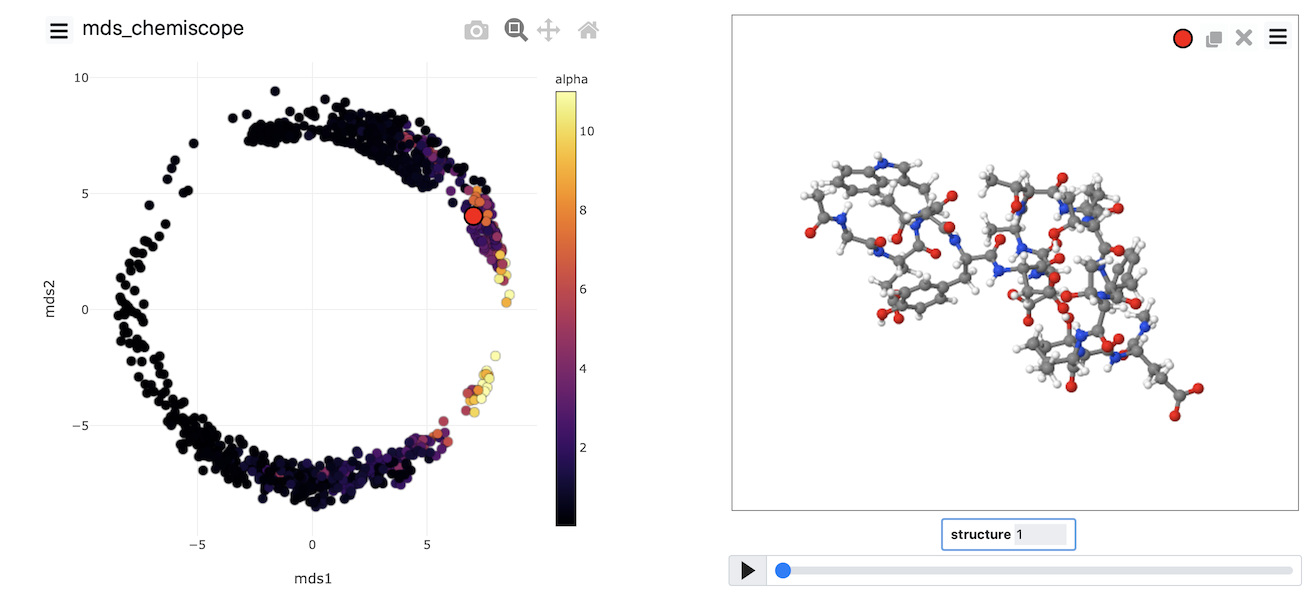
Try to generate an image that looks like this one yourself by completing the input above and then using what you learned about generating chemiscope representations in the previous exercise.
Sketch-map
The two algorithms (PCA and MDS) that we have looked at thus far are linear dimensionality reduction algorithms. In addition to these, there are a whole class of non-linear dimensionality reduction
reduction algorithms which work by transforming the matrix of dissimilarities between configurations, calculating geodesic rather than Euclidean distances between configurations or by changing the form of the
loss function that is optimized. In this final exercise, we will use an algorithm that uses the last of these three strategies to construct a non-linear projection. The algorithm is known as sketch-map
and input for sketch-map is provided below:
MOLINFOThis command is used to provide information on the molecules that are present in your system. More details STRUCTUREa file in pdb format containing a reference structure=__FILL__ MOLTYPE what kind of molecule is contained in the pdb file - usually not needed since protein/RNA/DNA are compatible=protein
The MOLINFO action with label calculates somethingcc: COLLECT_FRAMESCollect atomic positions or argument values from the trajectory for later analysis More details __FILL__=@nonhydrogensall non hydrogen atoms. Click here for more information.
The COLLECT_FRAMES action with label cc calculates the following quantities:| Quantity | Description |
| cc.data | the data that is being collected by this action |
| cc.logweights | the logarithms of the weights of the data points |
DUMPPDBOutput PDB file. More details __FILL__=cc_data ATOM_INDICESthe indices of the atoms in your PDB output=__FILL__ FILEthe name of the file on which to output these quantities=traj.pdb
r2-phi: TORSIONCalculate one or multiple torsional angles. More details ATOMSthe four atoms involved in the torsional angle=@phi-2the four atoms that are required to calculate the phi dihedral for residue 2. Click here for more information.
The TORSION action with label r2-phi calculates the following quantities:| Quantity | Description |
| r2-phi.value | the TORSION involving these atoms |
r2-psi: TORSIONCalculate one or multiple torsional angles. More details ATOMSthe four atoms involved in the torsional angle=@psi-2the four atoms that are required to calculate the psi dihedral for residue 2. Click here for more information.
The TORSION action with label r2-psi calculates the following quantities:| Quantity | Description |
| r2-psi.value | the TORSION involving these atoms |
r3-phi: TORSIONCalculate one or multiple torsional angles. More details ATOMSthe four atoms involved in the torsional angle=@phi-3the four atoms that are required to calculate the phi dihedral for residue 3. Click here for more information.
The TORSION action with label r3-phi calculates the following quantities:| Quantity | Description |
| r3-phi.value | the TORSION involving these atoms |
r3-psi: TORSIONCalculate one or multiple torsional angles. More details ATOMSthe four atoms involved in the torsional angle=@psi-3the four atoms that are required to calculate the psi dihedral for residue 3. Click here for more information.
The TORSION action with label r3-psi calculates the following quantities:| Quantity | Description |
| r3-psi.value | the TORSION involving these atoms |
r4-phi: TORSIONCalculate one or multiple torsional angles. More details __FILL__
The TORSION action with label r4-phi calculates the TORSION involving these atomsr4-psi: TORSIONCalculate one or multiple torsional angles. More details __FILL__
The TORSION action with label r4-psi calculates the TORSION involving these atomsr5-phi: TORSIONCalculate one or multiple torsional angles. More details __FILL__
The TORSION action with label r5-phi calculates the TORSION involving these atomsr5-psi: TORSIONCalculate one or multiple torsional angles. More details __FILL__
The TORSION action with label r5-psi calculates the TORSION involving these atomsr6-phi: TORSIONCalculate one or multiple torsional angles. More details __FILL__
The TORSION action with label r6-phi calculates the TORSION involving these atomsr6-psi: TORSIONCalculate one or multiple torsional angles. More details __FILL__
The TORSION action with label r6-psi calculates the TORSION involving these atomsr7-phi: TORSIONCalculate one or multiple torsional angles. More details __FILL__
The TORSION action with label r7-phi calculates the TORSION involving these atomsr7-psi: TORSIONCalculate one or multiple torsional angles. More details __FILL__
The TORSION action with label r7-psi calculates the TORSION involving these atomsr8-phi: TORSIONCalculate one or multiple torsional angles. More details __FILL__
The TORSION action with label r8-phi calculates the TORSION involving these atomsr8-psi: TORSIONCalculate one or multiple torsional angles. More details __FILL__
The TORSION action with label r8-psi calculates the TORSION involving these atomsr9-phi: TORSIONCalculate one or multiple torsional angles. More details __FILL__
The TORSION action with label r9-phi calculates the TORSION involving these atomsr9-psi: TORSIONCalculate one or multiple torsional angles. More details __FILL__
The TORSION action with label r9-psi calculates the TORSION involving these atomsr10-phi: TORSIONCalculate one or multiple torsional angles. More details __FILL__
The TORSION action with label r10-phi calculates the TORSION involving these atomsr10-psi: TORSIONCalculate one or multiple torsional angles. More details __FILL__
The TORSION action with label r10-psi calculates the TORSION involving these atomsr11-phi: TORSIONCalculate one or multiple torsional angles. More details __FILL__
The TORSION action with label r11-phi calculates the TORSION involving these atomsr11-psi: TORSIONCalculate one or multiple torsional angles. More details __FILL__
The TORSION action with label r11-psi calculates the TORSION involving these atomsr12-phi: TORSIONCalculate one or multiple torsional angles. More details __FILL__
The TORSION action with label r12-phi calculates the TORSION involving these atomsr12-psi: TORSIONCalculate one or multiple torsional angles. More details __FILL__
The TORSION action with label r12-psi calculates the TORSION involving these atomsr13-phi: TORSIONCalculate one or multiple torsional angles. More details __FILL__
The TORSION action with label r13-phi calculates the TORSION involving these atomsr13-psi: TORSIONCalculate one or multiple torsional angles. More details __FILL__
The TORSION action with label r13-psi calculates the TORSION involving these atomsr14-phi: TORSIONCalculate one or multiple torsional angles. More details __FILL__
The TORSION action with label r14-phi calculates the TORSION involving these atomsr14-psi: TORSIONCalculate one or multiple torsional angles. More details __FILL__
The TORSION action with label r14-psi calculates the TORSION involving these atomsr15-phi: TORSIONCalculate one or multiple torsional angles. More details __FILL__
The TORSION action with label r15-phi calculates the TORSION involving these atomsr15-psi: TORSIONCalculate one or multiple torsional angles. More details __FILL__
The TORSION action with label r15-psi calculates the TORSION involving these atomsr16-phi: TORSIONCalculate one or multiple torsional angles. More details __FILL__
The TORSION action with label r16-phi calculates the TORSION involving these atomsr16-psi: TORSIONCalculate one or multiple torsional angles. More details __FILL__
The TORSION action with label r16-psi calculates the TORSION involving these atomsangles: COLLECT_FRAMESCollect atomic positions or argument values from the trajectory for later analysis More details __FILL__=r2-phi,r2-psi,r3-phi,r3-psi,r4-phi,r4-psi,r5-phi,r5-psi,r6-phi,r6-psi,r7-phi,r7-psi,r8-phi,r8-psi,r9-phi,r9-psi,r10-phi,r10-psi,r11-phi,r11-psi,r12-phi,r12-psi,r13-phi,r13-psi,r14-phi,r14-psi,r15-phi,r15-psi,r16-phi,r16-psi
The COLLECT_FRAMES action with label angles calculates the following quantities:| Quantity | Description |
| angles.data | the data that is being collected by this action |
| angles.logweights | the logarithms of the weights of the data points |
fps: LANDMARK_SELECT_FPSSelect a of landmarks from a large set of configurations using farthest point sampling. More details ARGthe COLLECT_FRAMES action that you used to get the data=__FILL__ NLANDMARKSthe numbe rof landmarks you would like to create=500
The LANDMARK_SELECT_FPS action with label fps calculates the following quantities:| Quantity | Description |
| fps.data | the data that is being collected by this action |
| fps.logweights | the logarithms of the weights of the data points |
smap: SKETCHMAPConstruct a sketch map projection of the input data More details __FILL__=fps NLOW_DIMnumber of low-dimensional coordinates required=2 PROJECT_ALL if the input are landmark coordinates then project the out of sample configurations HIGH_DIM_FUNCTIONthe parameters of the switching function in the high dimensional space={SMAP R_0=6 A=8 B=2} LOW_DIM_FUNCTIONthe parameters of the switching function in the low dimensional space={SMAP R_0=6 A=2 B=2} CGTOL The tolerance for the conjugate gradient minimization that finds the projection of the landmarks=1E-3 NCYCLES The number of cycles of pointwise global optimisation that are required=3 CGRID_SIZE number of points to use in each grid direction=20,20 FGRID_SIZE interpolate the grid onto this number of points -- only works in 2D=200,200
The SKETCHMAP action with label smap calculates the following quantities:| Quantity | Description |
| smap.value | the sketch-map projection of the input points |
| smap.osample | the out-of-sample projections |
DUMPVECTORPrint a vector to a file More details __FILL__=smap_osample ARGthe labels of vectors/matrices that should be output in the file=osample.* FILE the file on which to write the vetors=smap_data
alpha: ALPHARMSDProbe the alpha helical content of a protein structure. More details RESIDUESthis command is used to specify the set of residues that could conceivably form part of the secondary structure=all
The ALPHARMSD action with label alpha calculates the following quantities:| Quantity | Description |
| alpha.struct | the vectors containing the rmsd distances between the residues and each of the reference structures |
| alpha.lessthan | the number blocks of residues that have an RMSD from the secondary structure that is less than the threshold |
| alpha.value | if LESS_THAN is present the RMSD distance between each residue and the ideal alpha helix |
abeta: ANTIBETARMSDProbe the antiparallel beta sheet content of your protein structure. More details RESIDUESthis command is used to specify the set of residues that could conceivably form part of the secondary structure=all STRANDS_CUTOFFIf in a segment of protein the two strands are further apart then the calculation of the actual RMSD is skipped as the structure is very far from being beta-sheet like=1.0
The ANTIBETARMSD action with label abeta calculates the following quantities:| Quantity | Description |
| abeta.struct | the vectors containing the rmsd distances between the residues and each of the reference structures |
| abeta.lessthan | the number blocks of residues that have an RMSD from the secondary structure that is less than the threshold |
| abeta.value | if LESS_THAN is present the RMSD distance between each residue and the ideal antiparallel beta sheet |
pbeta: PARABETARMSDProbe the parallel beta sheet content of your protein structure. More details RESIDUESthis command is used to specify the set of residues that could conceivably form part of the secondary structure=all STRANDS_CUTOFFIf in a segment of protein the two strands are further apart then the calculation of the actual RMSD is skipped as the structure is very far from being beta-sheet like=1.0
The PARABETARMSD action with label pbeta calculates the following quantities:| Quantity | Description |
| pbeta.struct | the vectors containing the rmsd distances between the residues and each of the reference structures |
| pbeta.lessthan | the number blocks of residues that have an RMSD from the secondary structure that is less than the threshold |
| pbeta.value | if LESS_THAN is present the RMSD distance between each residue and the ideal parallel beta sheet |
cc2: COLLECT_FRAMESCollect atomic positions or argument values from the trajectory for later analysis More details ARGthe labels of the values whose time series you would like to collect for later analysis=alpha,abeta,pbeta
The COLLECT_FRAMES action with label cc2 calculates the following quantities:| Quantity | Description |
| cc2.data | the data that is being collected by this action |
| cc2.logweights | the logarithms of the weights of the data points |
DUMPVECTORPrint a vector to a file More details ARGthe labels of vectors/matrices that should be output in the file=cc2_data FILE the file on which to write the vetors=secondary_structure_data
MOLINFOThis command is used to provide information on the molecules that are present in your system. More details STRUCTUREa file in pdb format containing a reference structure=../data/bhp.pdb MOLTYPE what kind of molecule is contained in the pdb file - usually not needed since protein/RNA/DNA are compatible=protein
The MOLINFO action with label calculates somethingcc: COLLECT_FRAMESCollect atomic positions or argument values from the trajectory for later analysis More details ATOMSlist of atomic positions that you would like to collect and store for later analysis=@nonhydrogensall non hydrogen atoms. Click here for more information.
The COLLECT_FRAMES action with label cc calculates the following quantities:| Quantity | Description |
| cc.data | the data that is being collected by this action |
| cc.logweights | the logarithms of the weights of the data points |
DUMPPDBOutput PDB file. More details ATOMSvalue containing positions of atoms that should be output=cc_data ATOM_INDICESthe indices of the atoms in your PDB output=@nonhydrogensall non hydrogen atoms. Click here for more information. FILEthe name of the file on which to output these quantities=traj.pdb
r2-phi: TORSIONCalculate one or multiple torsional angles. More details ATOMSthe four atoms involved in the torsional angle=@phi-2the four atoms that are required to calculate the phi dihedral for residue 2. Click here for more information.
The TORSION action with label r2-phi calculates the following quantities:| Quantity | Description |
| r2-phi.value | the TORSION involving these atoms |
r2-psi: TORSIONCalculate one or multiple torsional angles. More details ATOMSthe four atoms involved in the torsional angle=@psi-2the four atoms that are required to calculate the psi dihedral for residue 2. Click here for more information.
The TORSION action with label r2-psi calculates the following quantities:| Quantity | Description |
| r2-psi.value | the TORSION involving these atoms |
r3-phi: TORSIONCalculate one or multiple torsional angles. More details ATOMSthe four atoms involved in the torsional angle=@phi-3the four atoms that are required to calculate the phi dihedral for residue 3. Click here for more information.
The TORSION action with label r3-phi calculates the following quantities:| Quantity | Description |
| r3-phi.value | the TORSION involving these atoms |
r3-psi: TORSIONCalculate one or multiple torsional angles. More details ATOMSthe four atoms involved in the torsional angle=@psi-3the four atoms that are required to calculate the psi dihedral for residue 3. Click here for more information.
The TORSION action with label r3-psi calculates the following quantities:| Quantity | Description |
| r3-psi.value | the TORSION involving these atoms |
r4-phi: TORSIONCalculate one or multiple torsional angles. More details ATOMSthe four atoms involved in the torsional angle=@phi-4the four atoms that are required to calculate the phi dihedral for residue 4. Click here for more information.
The TORSION action with label r4-phi calculates the following quantities:| Quantity | Description |
| r4-phi.value | the TORSION involving these atoms |
r4-psi: TORSIONCalculate one or multiple torsional angles. More details ATOMSthe four atoms involved in the torsional angle=@psi-4the four atoms that are required to calculate the psi dihedral for residue 4. Click here for more information.
The TORSION action with label r4-psi calculates the following quantities:| Quantity | Description |
| r4-psi.value | the TORSION involving these atoms |
r5-phi: TORSIONCalculate one or multiple torsional angles. More details ATOMSthe four atoms involved in the torsional angle=@phi-5the four atoms that are required to calculate the phi dihedral for residue 5. Click here for more information.
The TORSION action with label r5-phi calculates the following quantities:| Quantity | Description |
| r5-phi.value | the TORSION involving these atoms |
r5-psi: TORSIONCalculate one or multiple torsional angles. More details ATOMSthe four atoms involved in the torsional angle=@psi-5the four atoms that are required to calculate the psi dihedral for residue 5. Click here for more information.
The TORSION action with label r5-psi calculates the following quantities:| Quantity | Description |
| r5-psi.value | the TORSION involving these atoms |
r6-phi: TORSIONCalculate one or multiple torsional angles. More details ATOMSthe four atoms involved in the torsional angle=@phi-6the four atoms that are required to calculate the phi dihedral for residue 6. Click here for more information.
The TORSION action with label r6-phi calculates the following quantities:| Quantity | Description |
| r6-phi.value | the TORSION involving these atoms |
r6-psi: TORSIONCalculate one or multiple torsional angles. More details ATOMSthe four atoms involved in the torsional angle=@psi-6the four atoms that are required to calculate the psi dihedral for residue 6. Click here for more information.
The TORSION action with label r6-psi calculates the following quantities:| Quantity | Description |
| r6-psi.value | the TORSION involving these atoms |
r7-phi: TORSIONCalculate one or multiple torsional angles. More details ATOMSthe four atoms involved in the torsional angle=@phi-7the four atoms that are required to calculate the phi dihedral for residue 7. Click here for more information.
The TORSION action with label r7-phi calculates the following quantities:| Quantity | Description |
| r7-phi.value | the TORSION involving these atoms |
r7-psi: TORSIONCalculate one or multiple torsional angles. More details ATOMSthe four atoms involved in the torsional angle=@psi-7the four atoms that are required to calculate the psi dihedral for residue 7. Click here for more information.
The TORSION action with label r7-psi calculates the following quantities:| Quantity | Description |
| r7-psi.value | the TORSION involving these atoms |
r8-phi: TORSIONCalculate one or multiple torsional angles. More details ATOMSthe four atoms involved in the torsional angle=@phi-8the four atoms that are required to calculate the phi dihedral for residue 8. Click here for more information.
The TORSION action with label r8-phi calculates the following quantities:| Quantity | Description |
| r8-phi.value | the TORSION involving these atoms |
r8-psi: TORSIONCalculate one or multiple torsional angles. More details ATOMSthe four atoms involved in the torsional angle=@psi-8the four atoms that are required to calculate the psi dihedral for residue 8. Click here for more information.
The TORSION action with label r8-psi calculates the following quantities:| Quantity | Description |
| r8-psi.value | the TORSION involving these atoms |
r9-phi: TORSIONCalculate one or multiple torsional angles. More details ATOMSthe four atoms involved in the torsional angle=@phi-9the four atoms that are required to calculate the phi dihedral for residue 9. Click here for more information.
The TORSION action with label r9-phi calculates the following quantities:| Quantity | Description |
| r9-phi.value | the TORSION involving these atoms |
r9-psi: TORSIONCalculate one or multiple torsional angles. More details ATOMSthe four atoms involved in the torsional angle=@psi-9the four atoms that are required to calculate the psi dihedral for residue 9. Click here for more information.
The TORSION action with label r9-psi calculates the following quantities:| Quantity | Description |
| r9-psi.value | the TORSION involving these atoms |
r10-phi: TORSIONCalculate one or multiple torsional angles. More details ATOMSthe four atoms involved in the torsional angle=@phi-10the four atoms that are required to calculate the phi dihedral for residue 10. Click here for more information.
The TORSION action with label r10-phi calculates the following quantities:| Quantity | Description |
| r10-phi.value | the TORSION involving these atoms |
r10-psi: TORSIONCalculate one or multiple torsional angles. More details ATOMSthe four atoms involved in the torsional angle=@psi-10the four atoms that are required to calculate the psi dihedral for residue 10. Click here for more information.
The TORSION action with label r10-psi calculates the following quantities:| Quantity | Description |
| r10-psi.value | the TORSION involving these atoms |
r11-phi: TORSIONCalculate one or multiple torsional angles. More details ATOMSthe four atoms involved in the torsional angle=@phi-11the four atoms that are required to calculate the phi dihedral for residue 11. Click here for more information.
The TORSION action with label r11-phi calculates the following quantities:| Quantity | Description |
| r11-phi.value | the TORSION involving these atoms |
r11-psi: TORSIONCalculate one or multiple torsional angles. More details ATOMSthe four atoms involved in the torsional angle=@psi-11the four atoms that are required to calculate the psi dihedral for residue 11. Click here for more information.
The TORSION action with label r11-psi calculates the following quantities:| Quantity | Description |
| r11-psi.value | the TORSION involving these atoms |
r12-phi: TORSIONCalculate one or multiple torsional angles. More details ATOMSthe four atoms involved in the torsional angle=@phi-12the four atoms that are required to calculate the phi dihedral for residue 12. Click here for more information.
The TORSION action with label r12-phi calculates the following quantities:| Quantity | Description |
| r12-phi.value | the TORSION involving these atoms |
r12-psi: TORSIONCalculate one or multiple torsional angles. More details ATOMSthe four atoms involved in the torsional angle=@psi-12the four atoms that are required to calculate the psi dihedral for residue 12. Click here for more information.
The TORSION action with label r12-psi calculates the following quantities:| Quantity | Description |
| r12-psi.value | the TORSION involving these atoms |
r13-phi: TORSIONCalculate one or multiple torsional angles. More details ATOMSthe four atoms involved in the torsional angle=@phi-13the four atoms that are required to calculate the phi dihedral for residue 13. Click here for more information.
The TORSION action with label r13-phi calculates the following quantities:| Quantity | Description |
| r13-phi.value | the TORSION involving these atoms |
r13-psi: TORSIONCalculate one or multiple torsional angles. More details ATOMSthe four atoms involved in the torsional angle=@psi-13the four atoms that are required to calculate the psi dihedral for residue 13. Click here for more information.
The TORSION action with label r13-psi calculates the following quantities:| Quantity | Description |
| r13-psi.value | the TORSION involving these atoms |
r14-phi: TORSIONCalculate one or multiple torsional angles. More details ATOMSthe four atoms involved in the torsional angle=@phi-14the four atoms that are required to calculate the phi dihedral for residue 14. Click here for more information.
The TORSION action with label r14-phi calculates the following quantities:| Quantity | Description |
| r14-phi.value | the TORSION involving these atoms |
r14-psi: TORSIONCalculate one or multiple torsional angles. More details ATOMSthe four atoms involved in the torsional angle=@psi-14the four atoms that are required to calculate the psi dihedral for residue 14. Click here for more information.
The TORSION action with label r14-psi calculates the following quantities:| Quantity | Description |
| r14-psi.value | the TORSION involving these atoms |
r15-phi: TORSIONCalculate one or multiple torsional angles. More details ATOMSthe four atoms involved in the torsional angle=@phi-15the four atoms that are required to calculate the phi dihedral for residue 15. Click here for more information.
The TORSION action with label r15-phi calculates the following quantities:| Quantity | Description |
| r15-phi.value | the TORSION involving these atoms |
r15-psi: TORSIONCalculate one or multiple torsional angles. More details ATOMSthe four atoms involved in the torsional angle=@psi-15the four atoms that are required to calculate the psi dihedral for residue 15. Click here for more information.
The TORSION action with label r15-psi calculates the following quantities:| Quantity | Description |
| r15-psi.value | the TORSION involving these atoms |
r16-phi: TORSIONCalculate one or multiple torsional angles. More details ATOMSthe four atoms involved in the torsional angle=@phi-16the four atoms that are required to calculate the phi dihedral for residue 16. Click here for more information.
The TORSION action with label r16-phi calculates the following quantities:| Quantity | Description |
| r16-phi.value | the TORSION involving these atoms |
r16-psi: TORSIONCalculate one or multiple torsional angles. More details ATOMSthe four atoms involved in the torsional angle=@psi-16the four atoms that are required to calculate the psi dihedral for residue 16. Click here for more information.
The TORSION action with label r16-psi calculates the following quantities:| Quantity | Description |
| r16-psi.value | the TORSION involving these atoms |
angles: COLLECT_FRAMESCollect atomic positions or argument values from the trajectory for later analysis More details ARGthe labels of the values whose time series you would like to collect for later analysis=r2-phi,r2-psi,r3-phi,r3-psi,r4-phi,r4-psi,r5-phi,r5-psi,r6-phi,r6-psi,r7-phi,r7-psi,r8-phi,r8-psi,r9-phi,r9-psi,r10-phi,r10-psi,r11-phi,r11-psi,r12-phi,r12-psi,r13-phi,r13-psi,r14-phi,r14-psi,r15-phi,r15-psi,r16-phi,r16-psi
The COLLECT_FRAMES action with label angles calculates the following quantities:| Quantity | Description |
| angles.data | the data that is being collected by this action |
| angles.logweights | the logarithms of the weights of the data points |
fps: LANDMARK_SELECT_FPSSelect a of landmarks from a large set of configurations using farthest point sampling. More details ARGthe COLLECT_FRAMES action that you used to get the data=angles NLANDMARKSthe numbe rof landmarks you would like to create=500
The LANDMARK_SELECT_FPS action with label fps calculates the following quantities:| Quantity | Description |
| fps.data | the data that is being collected by this action |
| fps.logweights | the logarithms of the weights of the data points |
smap: SKETCHMAPConstruct a sketch map projection of the input data More details ARGthe matrix of high dimensional coordinates that you want to project in the low dimensional space=fps NLOW_DIMnumber of low-dimensional coordinates required=2 PROJECT_ALL if the input are landmark coordinates then project the out of sample configurations HIGH_DIM_FUNCTIONthe parameters of the switching function in the high dimensional space={SMAP R_0=6 A=8 B=2} LOW_DIM_FUNCTIONthe parameters of the switching function in the low dimensional space={SMAP R_0=6 A=2 B=2} CGTOL The tolerance for the conjugate gradient minimization that finds the projection of the landmarks=1E-3 NCYCLES The number of cycles of pointwise global optimisation that are required=3 CGRID_SIZE number of points to use in each grid direction=20,20 FGRID_SIZE interpolate the grid onto this number of points -- only works in 2D=200,200
The SKETCHMAP action with label smap calculates the following quantities:| Quantity | Description |
| smap.value | the sketch-map projection of the input points |
| smap.osample | the out-of-sample projections |
DUMPVECTORPrint a vector to a file More details ARGthe labels of vectors/matrices that should be output in the file=smap_osample FILE the file on which to write the vetors=smap_data
alpha: ALPHARMSDProbe the alpha helical content of a protein structure. More details RESIDUESthis command is used to specify the set of residues that could conceivably form part of the secondary structure=all
The ALPHARMSD action with label alpha calculates the following quantities:| Quantity | Description |
| alpha.struct | the vectors containing the rmsd distances between the residues and each of the reference structures |
| alpha.lessthan | the number blocks of residues that have an RMSD from the secondary structure that is less than the threshold |
| alpha.value | if LESS_THAN is present the RMSD distance between each residue and the ideal alpha helix |
abeta: ANTIBETARMSDProbe the antiparallel beta sheet content of your protein structure. More details RESIDUESthis command is used to specify the set of residues that could conceivably form part of the secondary structure=all STRANDS_CUTOFFIf in a segment of protein the two strands are further apart then the calculation of the actual RMSD is skipped as the structure is very far from being beta-sheet like=1.0
The ANTIBETARMSD action with label abeta calculates the following quantities:| Quantity | Description |
| abeta.struct | the vectors containing the rmsd distances between the residues and each of the reference structures |
| abeta.lessthan | the number blocks of residues that have an RMSD from the secondary structure that is less than the threshold |
| abeta.value | if LESS_THAN is present the RMSD distance between each residue and the ideal antiparallel beta sheet |
pbeta: PARABETARMSDProbe the parallel beta sheet content of your protein structure. More details RESIDUESthis command is used to specify the set of residues that could conceivably form part of the secondary structure=all STRANDS_CUTOFFIf in a segment of protein the two strands are further apart then the calculation of the actual RMSD is skipped as the structure is very far from being beta-sheet like=1.0
The PARABETARMSD action with label pbeta calculates the following quantities:| Quantity | Description |
| pbeta.struct | the vectors containing the rmsd distances between the residues and each of the reference structures |
| pbeta.lessthan | the number blocks of residues that have an RMSD from the secondary structure that is less than the threshold |
| pbeta.value | if LESS_THAN is present the RMSD distance between each residue and the ideal parallel beta sheet |
cc2: COLLECT_FRAMESCollect atomic positions or argument values from the trajectory for later analysis More details ARGthe labels of the values whose time series you would like to collect for later analysis=alpha,abeta,pbeta
The COLLECT_FRAMES action with label cc2 calculates the following quantities:| Quantity | Description |
| cc2.data | the data that is being collected by this action |
| cc2.logweights | the logarithms of the weights of the data points |
DUMPVECTORPrint a vector to a file More details ARGthe labels of vectors/matrices that should be output in the file=cc2_data FILE the file on which to write the vetors=secondary_structure_data
This input collects all the torsional angles for the configurations in the trajectory. Then, at the end of the calculation, the matrix of distances between these points is computed, and a set of landmark points
is selected using a method known as farthest point sampling. A matrix that contains only those distances between the landmarks is then constructed and diagonalized by the CLASSICAL_MDS action, and this
set of projections is used as the initial configuration for the various minimization algorithms that are then used to optimize the sketch-map stress function. As in the previous exercise, once the projections of
the landmarks are found, the projections for the remainder of the points in the trajectory are found by using the PROJECT_POINTS action. This is managed by the SKETCHMAP shortcut action, however.
Try to fill in the blanks in the input above and run this calculation now using the command:
plumed driver --mf_pdb traj.pdb
Once the calculation has completed, you can, once again, visualize the data generated using chemiscope by using the scripts from earlier exercises. My projection is shown in the figure below. Points are, once again,
coloured following the alpha-helical content of the corresponding structure.
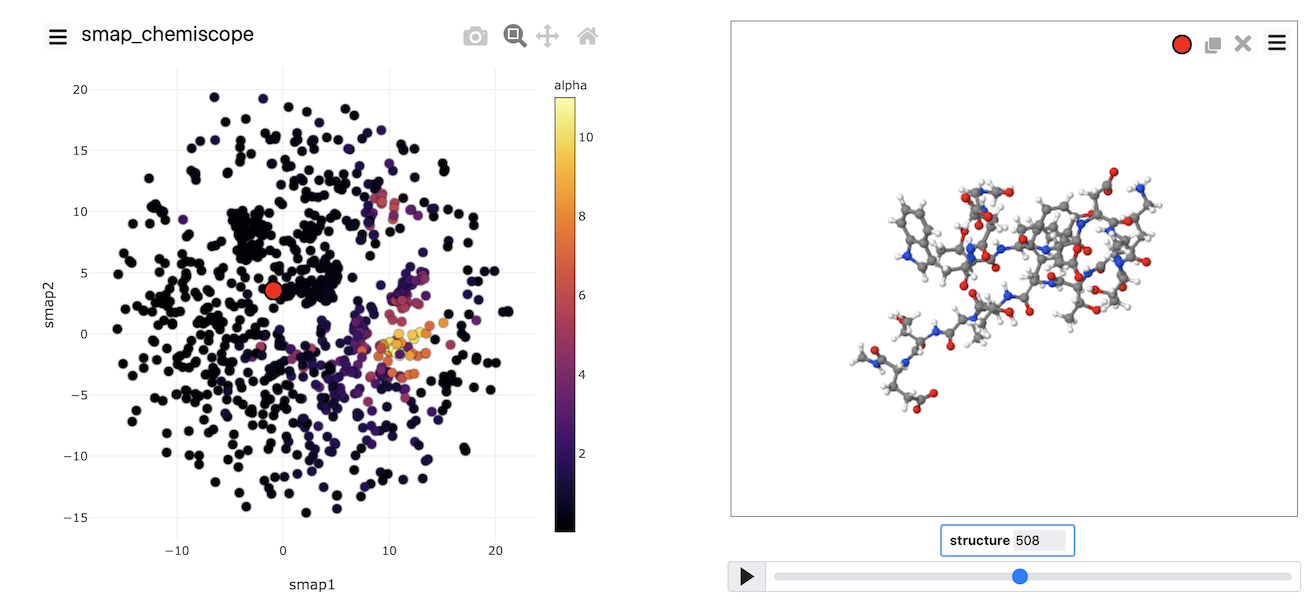
Try to see if you can reproduce an image that looks like the one above
Summary
This exercise has shown you that running dimensionality reduction algorithms using PLUMED involves the following stages:
- Data is collected from the trajectory using COLLECT_FRAMES.
- Landmark points are selected using a landmarks algorithm
- A loss function is optimized to generate projections of the landmarks.
- Projections of the non-landmark points are found
There are multiple choices to be made in each of the various stages described above. For example, you can change the particular sort of data this is collected from the
trajectory. There are multiple different ways to select landmarks. You can use the distances directly, or you can transform them. You can use various loss functions and
optimize the loss function using a variety of different algorithms. When you tackle your own research problems using these methods, you can experiment with the various choices that can
be made.
Generating a low-dimensional representation using these algorithms is not enough to publish a paper. We want to get some physical understanding from our simulation. Gaining this understanding is the hard part.